
CPD RESOURCE
HCPC CPD audit guide: profile, evidence and examples
Preparing an HCPC CPD profile starts with understanding what to include and finding the records that support your learning. This guide explains the four profile sections, how to choose evidence and how one conference activity can become a useful supporting record.
It is for HCPC registrants across professions, whether you are keeping records as you go or have been selected for audit. The walkthrough uses a fictional physiotherapy example; the same approach to explaining learning and selecting evidence applies in other roles.
The four sections of an HCPC CPD profile
If you are selected for audit, HCPC asks you to submit a profile through your online account. Your ongoing CPD portfolio is the wider collection of activity records, reflections and evidence you keep. Your audit profile draws on that collection to explain how you meet the standards, with selected supporting evidence; you do not send your entire portfolio.
The current HCPC profile guidance sets out four sections:
- A summary of recent work or practice, up to 500 words. Describe your role, main responsibilities and the people you work with so the assessor can understand why your learning is relevant.
- A dated list of CPD activities. Include the activities undertaken since your last renewal. Explain any gaps of three or more consecutive months in your statement.
- A personal statement, maximum 1,500 words. Explain how you meet the CPD standards, focusing on what you learned and how it relates to quality of practice and benefit to service users. Selected activities can help illustrate your account.
- Supporting evidence. Include evidence for the activities discussed in your statement. You do not need to upload every document in your personal collection.
Your dated list gives the wider picture of your CPD. Your statement explains selected learning in more depth. HCPC is interested in the previous two years of your registration cycle; check your audit instructions for the period and submission deadline that apply to you.
The HCPC sample profiles can help you understand how these parts fit together. Use them to understand the approach and write about your own work and learning.
Choose activities and evidence that support your account
Choose activities you can explain: what you learned, why it was relevant and what happened when you considered or applied it. HCPC recognises that learning may confirm an existing approach, lead to a change or prove less useful than expected. Explain that honestly, including what you would do next. See its explanation of standards 3 and 4.
Give each piece of evidence a purpose
- A certificate or attendance record can support that you took part. Your notes explain what you gained from it.
- Reading or conference notes can show the ideas you considered and the questions they raised for your practice.
- A reflection or peer-discussion note can explain how your understanding developed and what you decided to explore or change.
- Relevant feedback or a review of your work can help support an account of what happened after you applied the learning, where available and appropriate to share.
Label the evidence so someone can follow the connection between a point in your statement and the material supporting it. Keep planned actions separate from outcomes you have already observed. A certificate alone cannot establish that an activity improved your practice.
Use the HCPC evidence guidance when selecting material. For more fictional examples, see our physiotherapy CPD examples and occupational therapy CPD examples.
HCPC CPD example: from conference notes to reflection
The screenshots follow a fictional physiotherapist attending a 12-hour football medicine and performance conference over 10 and 11 October 2026. Their learning question is how to bring objective measures, athlete feedback and uncertainty into discussions about return-to-play decisions. This is an example of recording learning, rather than clinical guidance.
The starting note contains the event details, the learning point and a planned discussion with colleagues. Follow how those details carry through the log, reflection and reviewed record. One activity can support part of a profile; it does not demonstrate the full range of CPD on its own.
Step 1: Capture the activity and your learning question
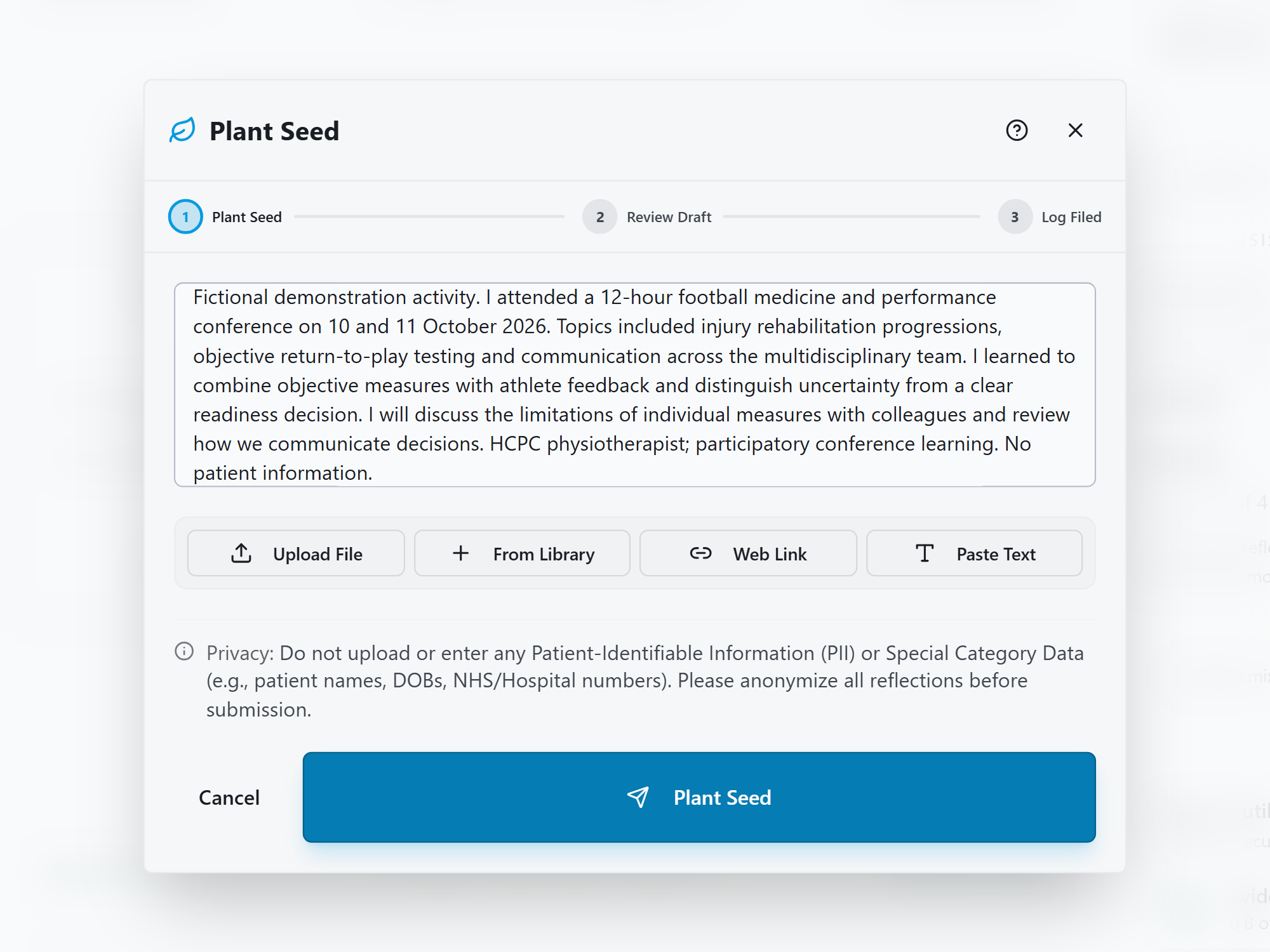
The seed records the dates and 12 hours of learning, followed by the person's own insight: they want to combine objective measures with athlete feedback and communicate uncertainty more clearly. It also records their intention to discuss the limitations of individual measures with colleagues.
These details give CPD logging a useful starting point. In your own record, check the time against what you actually attended and keep any permitted programme or attendance evidence alongside your notes in the Evidence Library.
Step 2: Check the details and suggested impact
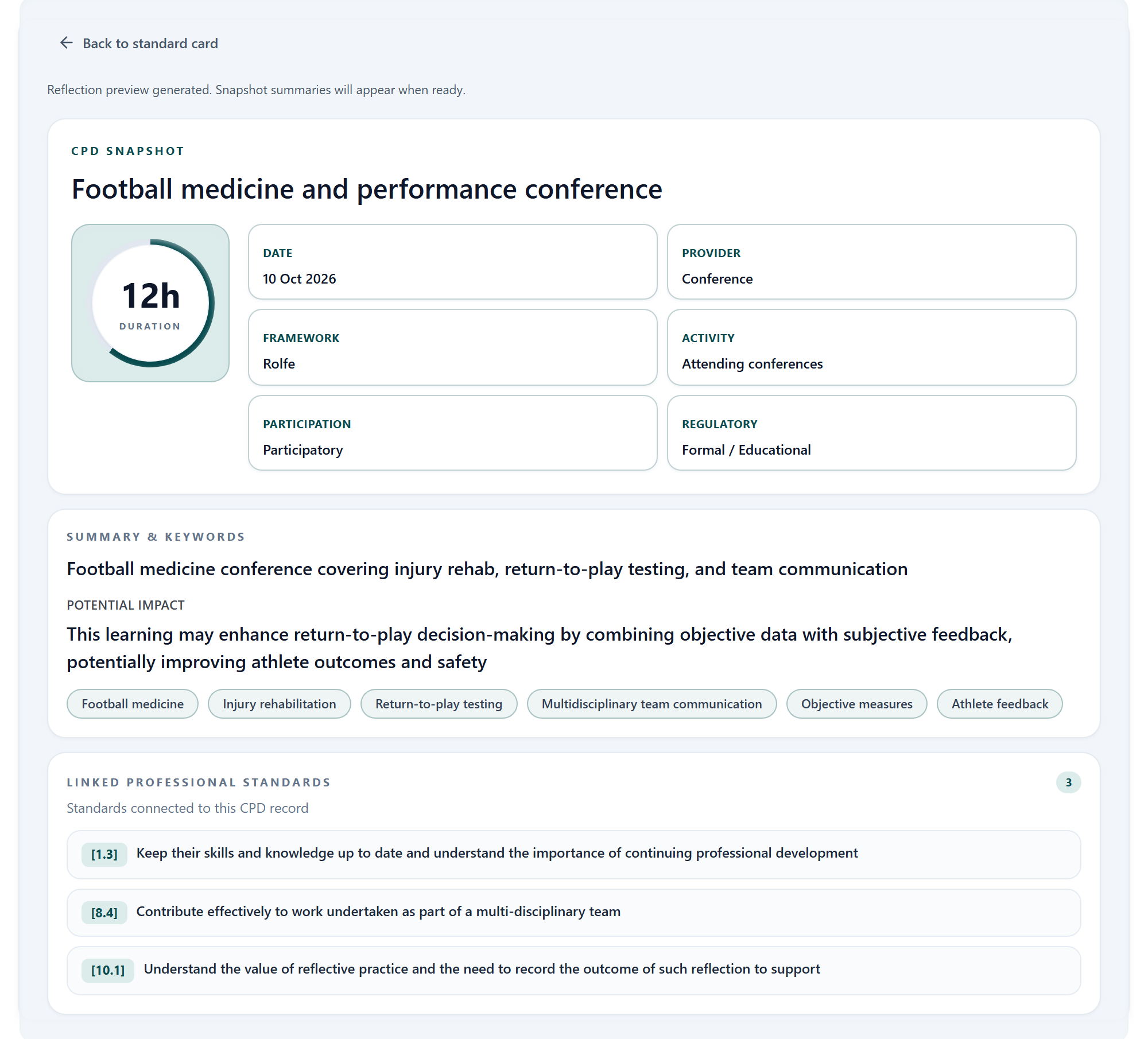
The screenshot shows a CPD Snapshot with a 12-hour duration, a start date of 10 October and a summary of the conference themes. Compare each detail with the original note and your supporting material. A multi-day event's start date should still be clear in the fuller account.
The potential-impact summary suggests possible benefits. The seed supports a learning point and a plan; it does not show that athlete outcomes have improved. Keep that distinction when reviewing the wording. Check suggested standards links too: linking a professional standard does not by itself demonstrate the five HCPC CPD standards.
Step 3: Build your reflection
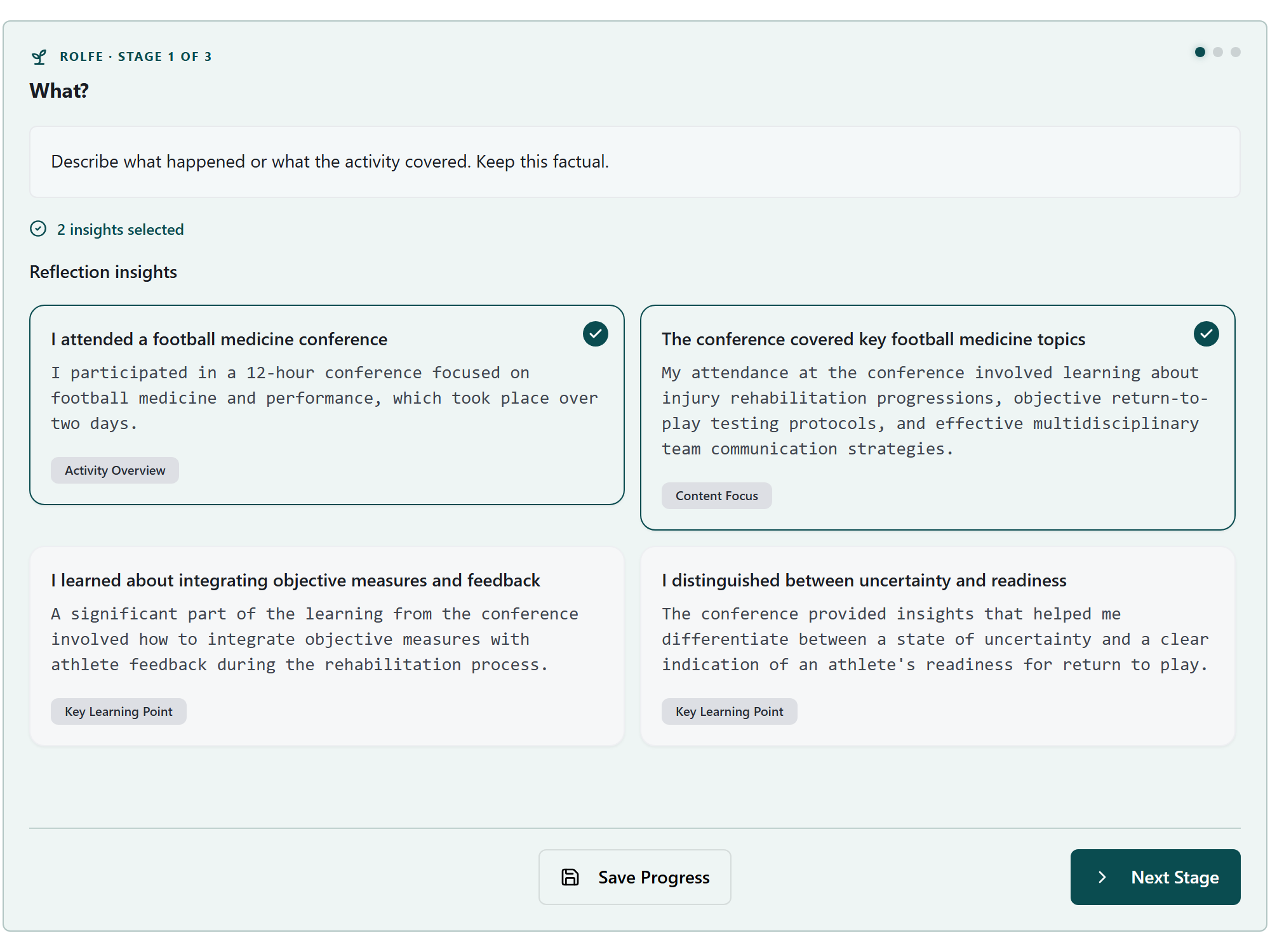
The Reflection Engine screenshot shows the first stage of a Rolfe reflection. The selected cards describe attendance and topics; other suggestions concern combining measures with feedback and recognising uncertainty. Choose only the insights that represent what you learned.
As you continue, explore why that learning matters in your role. For this example, the useful next question is how the team discusses the limits of a measure when deciding what to do next. Develop your answer from your experience, then review the resulting draft.
Rolfe and Gibbs are optional structures for reflection; this example does not make either an HCPC requirement.
Step 4: Review your reflection draft
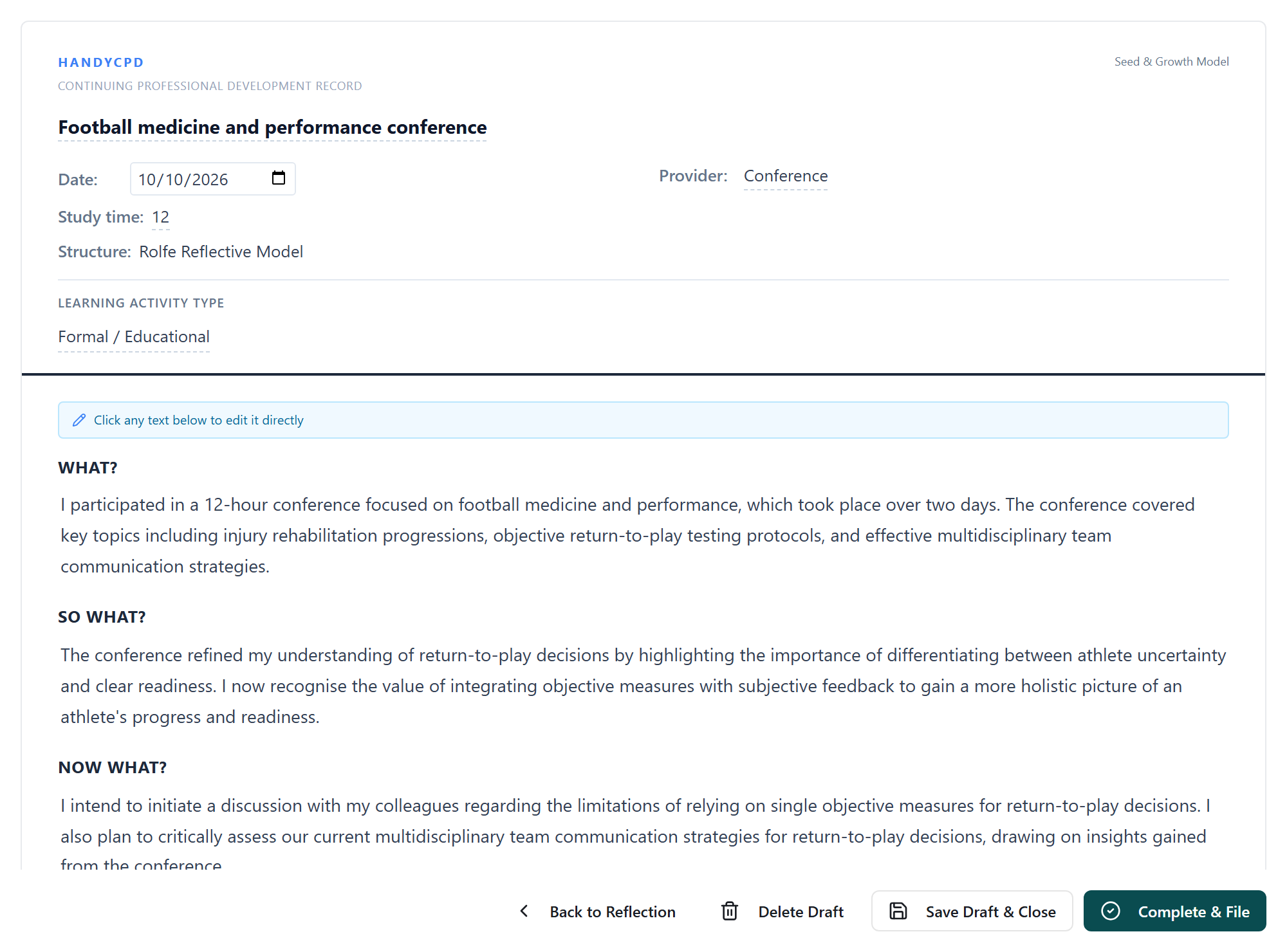
The draft carries the original learning through three parts: what the conference covered, why combining measures and feedback matters to the person, and their intention to discuss the limitations with colleagues. Check that each part remains faithful to the starting note.
The discussion and communication review are still planned. If the person later carries them out, they could add a dated follow-up explaining what happened, what changed and any benefit they can support. They should also record uncertainty or a result that differed from their expectations.
When preparing an audit profile, use a record like this to recall the learning and locate relevant evidence. Write your own account of how it contributes to the standards across your CPD, rather than treating a single reflection draft as a complete personal statement.
Step 5: Keep a reviewed copy with your supporting evidence
Export a PDF if you need a portable copy of the record. Check its contents and keep the relevant supporting evidence easy to find. A HandyCPD export is a supporting record; you still prepare and submit your profile through HCPC's process. See CPD PDF Export for the export workflow.
Using AI while keeping the profile your own work
HandyCPD can help organise your notes and offer reflection prompts and draft suggestions. HCPC's fifth CPD standard requires the profile to be your own work and supported by evidence. This guide does not treat that requirement as blanket approval of AI-written submissions.
Start from your actual activities and learning. Check every suggestion against your notes and evidence, remove unsupported claims and express your account in your own words. Reviewing an AI draft does not, by itself, establish that a profile meets HCPC's requirements. Leave confidential and identifiable information out of AI tools and stored examples.
You should be able to explain the learning and the evidence behind each point you submit. If you are unsure whether a proposed use of AI fits the own-work requirement, seek clarification from HCPC. Our CPD reflection guide offers prompts for developing your own account.
Final HCPC CPD audit preparation checklist
- Check your audit instructions: confirm the relevant period, deadline and submission process.
- Explain your role: make the practice summary clear enough for someone outside your workplace to understand why the learning matters.
- Review the full dated activity list: check the period is covered, show the mixture of learning types and explain gaps of three or more consecutive months.
- Develop your personal statement: explain learning, relevance, quality of practice and service-user benefit using examples you can substantiate.
- Match evidence to your examples: label the files clearly and include the material needed to support the activities discussed.
- Check the final account: distinguish plans from observed outcomes, remove identifying or confidential details and check the current word limits.
- Submit through your HCPC account: follow the official instructions and retain a copy of your profile and supporting files.
For a closer review of individual records, use the CPD audit preparation checklist. For everyday filing habits, see how to organise CPD records digitally.
Ready to organise HCPC CPD records you can review and approve?
Log CPD, attach evidence and build structured reflections with AI-supported drafts you edit before filing.
30-day Pro trial. No card required.