Evidence Library
A private evidence library for your CPD
CPD evidence often ends up scattered: certificates in email, course notes in downloads, presentation slides on a shared drive and reflection PDFs saved in different folders. HandyCPD helps you keep evidence and supporting documents organised alongside your professional development records: a private evidence library for everything behind your CPD.
You decide what to upload, link to a CPD record and keep for later review. HandyCPD supports organisation. It does not replace your judgement about what evidence belongs in your portfolio.
Your CPD evidence in one place
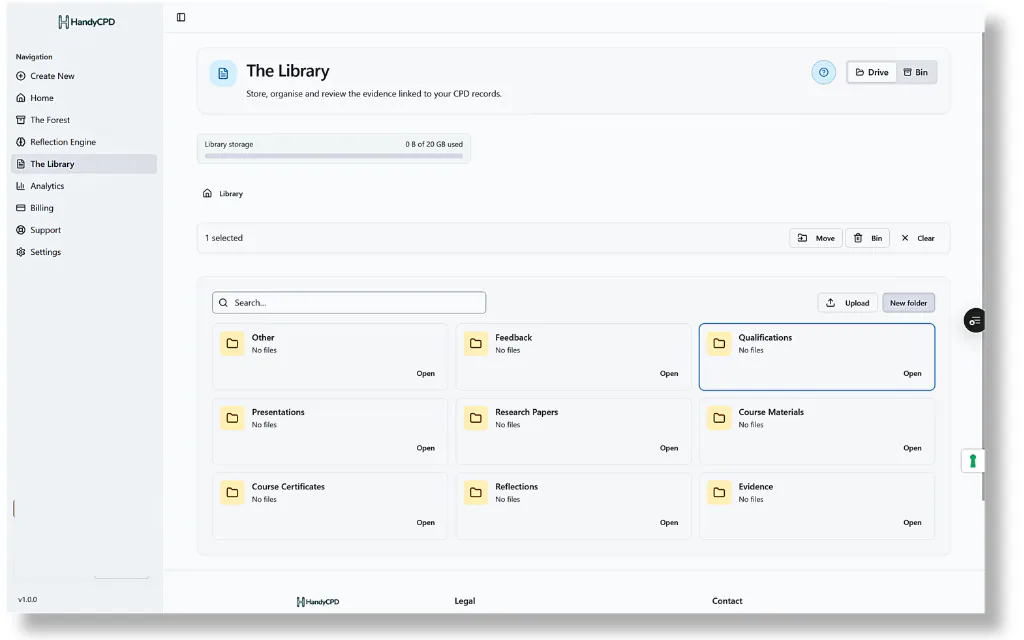
Use folders to group evidence by topic, year, activity type or however you prefer to work. Files stay in your account-based Library (not publicly listed), so you can return to certificates, notes and PDFs when you review a CPD record, prepare for appraisal or export a summary.
What the Evidence Library helps you store
The Library is designed for the files that sit behind your CPD, including:
- Evidence from individual CPD activities
- Certificates and qualification evidence
- Course notes, handouts and presentation slides
- Research papers or supporting reading materials
- Uploaded documents, screenshots and other supporting files
- Reflection PDFs generated in HandyCPD after you review and file a record
- Other professional development records you choose to keep organised
Built around your CPD workflow
Evidence connects across HandyCPD. In CPD logging, you can attach library files or upload supporting material while organising a draft record. The Reflection Engine can draw on linked evidence as you build a reflection, and completed reflection PDFs can be stored back in your Library. Standards mapping helps you link approved records to professional frameworks while evidence stays connected to each activity.
From your CPD Dashboard you can return to recent or in-progress records. CPD PDF exports are outputs you can keep in the Library alongside the source evidence, useful when you want a portable summary without losing the files behind it.
Storage that can grow with you
Library storage limits depend on your plan. Free accounts include 1 GB Library storage; Pro includes 20 GB. If you approach your limit, you can remove files you no longer need or upgrade when more space would help your workflow.
Protected, private and account-based
HandyCPD uses Supabase-backed storage and account-level access controls to keep Library files protected. Files are designed to stay private to your account; evidence is not publicly listed, and access is tied to your signed-in user. Only upload information you are entitled to store and that you are comfortable keeping in a cloud-based CPD tool.
Responsible evidence storage
You remain responsible for what you upload, store, export and share. HandyCPD can help organise CPD evidence, but you should keep any formal, original or legally required documents in line with your own employer, professional or regulator requirements.
Avoid uploading patient, client or service-user identifiable, confidential or special-category data unless you have a lawful basis and understand the risks. Where possible, use anonymised notes, redacted certificates and summaries rather than raw identifiable records.
Ready to organise your CPD evidence?
Keep certificates, notes and reflection PDFs in one private library alongside your CPD records.
30-day Pro trial. No card required.