CPD Analytics
CPD analytics: review your learning and plan ahead
Your CPD records tell you what you have logged. Analytics helps you step back and ask what those records show: the activities you return to, the topics you explore and the learning you may want to develop next. Use that picture to prepare for supervision, appraisal or your own development review.
For a quick return to unfinished work, use the Dashboard. Analytics is where you take a longer view.
Basic progress summaries are available on Free. Explore deeper charts and insights on Pro or during an active Pro trial.
CPD analysis example: three months before supervision
Imagine a professional preparing for a supervision meeting. They have kept records of reading, workshops and workplace learning, but want to explain what they have focused on and choose one useful next step. This fictional review follows a simple sequence: choose a period, notice a pattern, check the records and decide what to do.
1. Choose the period and records you want to review
Select 3 Months for this review. Check the record filter too: Filed & in progress, Fully reflected or Include drafts. These choices change which records contribute to the view, so keep them in mind when comparing periods.
Hours and participation give context. Activity Rhythm shows when records occur, while Record Progress shows where they sit in the workflow. A record marked as fully reflected has reached a workflow stage; that label does not measure how thoughtful or useful the reflection is.
2. Notice your learning mix, then check what it means
In our example, reading appears often in Learning Activities and collaborative learning is less visible. Before booking another course, the professional checks their records: did they mainly study alone, or have they forgotten to record useful discussions with colleagues?
CPD Categories and Learning Activities help you explore that mix. The charts describe what you recorded; a frequently used activity type is not automatically a problem. Decide whether the mix makes sense for your role and learning aims.
3. Explore recurring themes and standards links
The professional notices that one topic appears repeatedly. They open the detail view and check whether that focus was intentional. It might represent a development priority they have been working on, rather than a gap they need to correct.
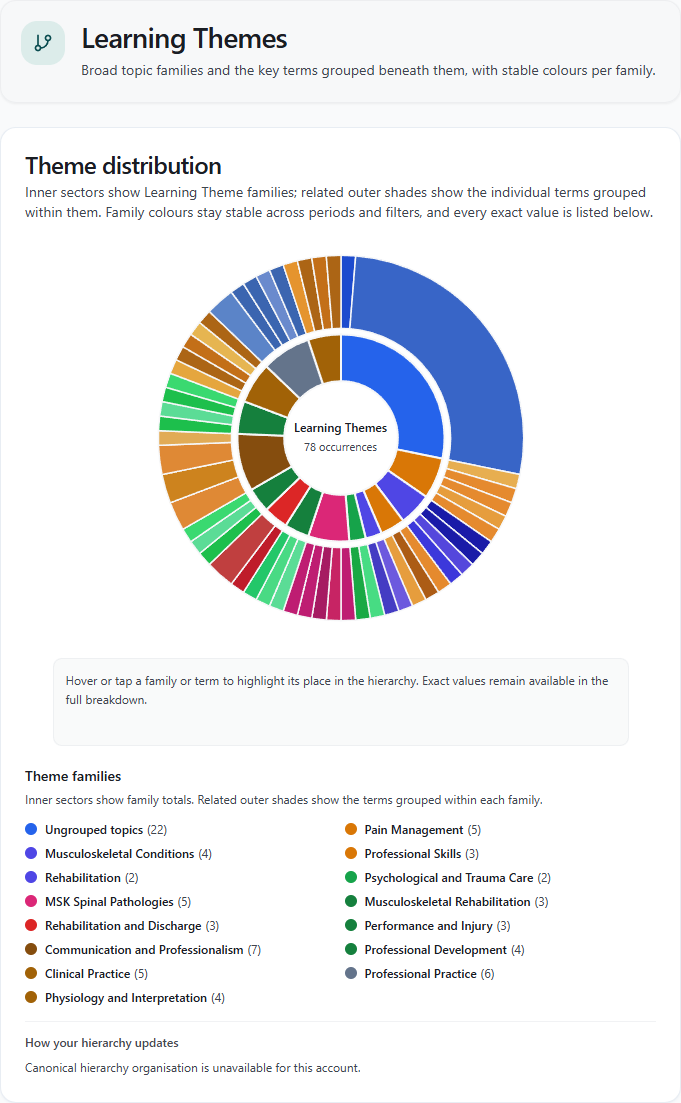
Learning Themes groups related terms into broader families. In the demonstration screenshot, clinical topics sit alongside communication and professional development. It illustrates the tool, rather than the fictional supervision review. Theme occurrences are not CPD hours or a score for the quality of your learning.
Standards-linked Activity provides another perspective where your records have mappings. Review the full breakdown and the underlying links: fewer mapped records may reflect missing links or a different learning focus. It does not, by itself, show that you have failed a standard.
4. Turn the review into one useful next step
After checking the records, the professional decides that discussing one of the articles with a colleague would help them test their understanding. They take that idea to supervision, arrange the discussion and later record what they learned from it.
Suggested Next Steps offers prompts based on patterns such as recurring topics, participatory hours and represented standards domains. Use a prompt to investigate your records and choose an appropriate action. HandyCPD cannot tell from chart counts alone whether your evidence is strong or your learning needs have been met.
What you can see on Free and Pro
- Free: review basic CPD hours, participatory hours and cycle health summaries.
- Pro or an active Pro trial: explore Standards-linked Activity, Recurring Terms, Learning Themes, Activity Rhythm, Record Progress, CPD Categories, Learning Activities, Feedback-linked Records and Suggested Next Steps.
The worked review above includes Pro views. Free users can see which deeper views are available without being shown Pro chart values. Read the Free and trial guide for the wider recording limits and feature differences.
Bring a clearer account of your learning to your next review
A nurse preparing for appraisal, a social worker approaching supervision and a project manager planning development can all use the same questions: what have I focused on, what have I learned, and what would be useful next? The records and professional requirements will differ.
Early accounts may have little to compare. Build an accurate set of records first, then return when you have enough learning to review a meaningful period.
Keep the review connected to your records
Capture activities with CPD logging, develop your thinking with the Reflection Engine, and check the relevance of suggested standards links. Analytics gives you reasons to return to those records and decide what deserves more attention.
Turn a CPD review into a useful next step
Check your progress on Free, or explore deeper learning patterns on Pro or during your trial. Start with a period you want to understand.
30-day Pro trial. No card required.