CPD Dashboard
Your CPD dashboard at a glance
CPD work rarely sits in one place: drafts in progress, notes waiting for reflection, completed records you want to find again. The HandyCPD Dashboard is your signed-in home for recent CPD activity, simple progress signals and quick access back into the records you are working on.
It is a lightweight overview to help you return to your CPD, not a deep analytics view. You remain responsible for reviewing and approving every record.
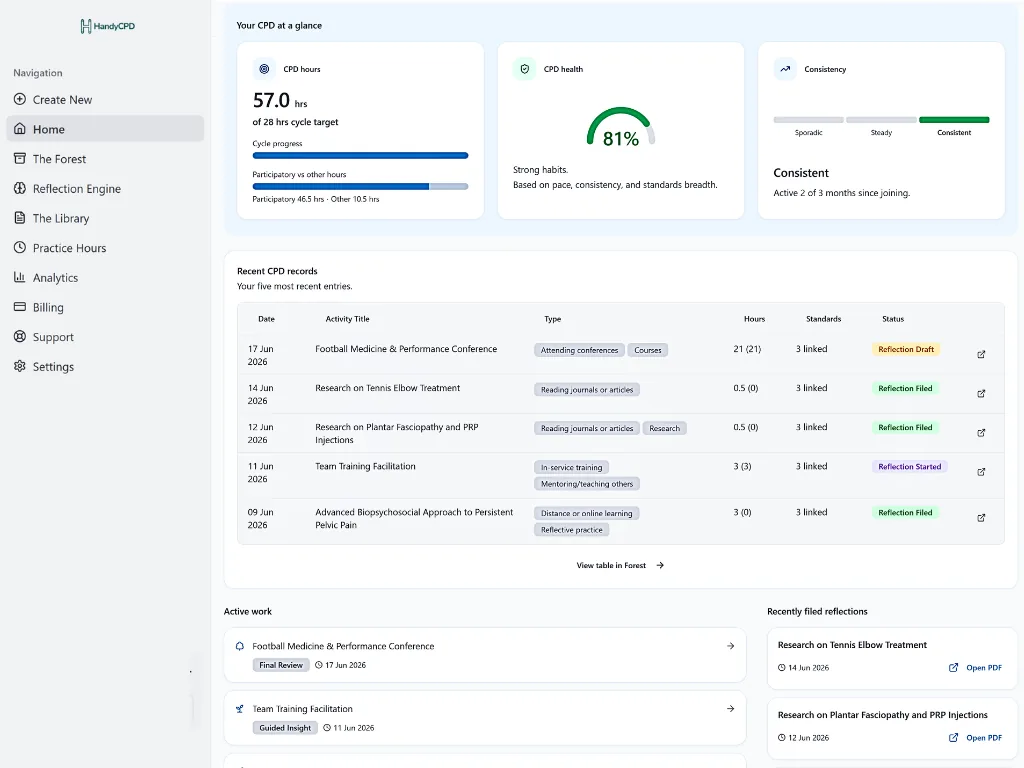
- Hours: logged CPD hours for your current cycle, with optional targets you define.
- CPD health: a simple signal to help you spot whether records are building steadily.
- Consistency: a plain-language hint about how regularly you have filed CPD over recent months.
Your CPD home
When you sign in, the Dashboard is where you land: your CPD overview, recent activity and next steps in one place. Instead of wondering where you left off, you can see what needs attention and jump straight back into a draft, a log or a filed reflection.
Simple progress signals
At the top of the Dashboard, three summary cards give you a quick read on your CPD rhythm:
- Hours: logged CPD hours for your current cycle. When you set an optional cycle target, you can compare progress against it. Not every regulator or employer focuses on hours, and targets are yours to define if they help your workflow.
- CPD health: gives you a simple signal to help you spot whether your records are building steadily, based on your pace, consistency and standards breadth. It supports organisation and reflection habits, not an official compliance score or regulator assessment.
- Consistency: a plain-language hint about how regularly you have filed CPD over recent months. It builds as you add records and is meant to encourage steady habits, not to judge your professional competence.
Recent activity in one table
Below the summary cards, a recent-activity table brings together CPD records across stages, from quick drafts and records in progress to recently filed reflections, so you can see what you logged lately without opening each record individually.
Quick access to what you are working on
The Dashboard also surfaces records that need your attention. Active Work shows recent drafts and records still in progress: a log waiting for reflection, or a reflection draft you have not yet filed. Recently Filed lists completed records you can reopen, including quick access to reflection PDFs where you have exported them.
Together, these panels help you resume CPD in minutes rather than reconstructing context from scattered notes.
Works with the rest of HandyCPD
The Dashboard connects the workflow around your records. CPD logging is where new activity starts; the Reflection Engine helps you shape drafts into structured reflections you review and approve. Linked evidence stays in your Evidence Library. When you want a deeper look at patterns, gaps or standards coverage over time, CPD analytics goes further than this home overview: charts, trends and review prompts rather than a daily resume screen.
Ready for a calmer CPD home screen?
See recent activity, simple progress signals and quick access back into the records you are working on.
30-day Pro trial. No card required.